ImmPort MCP Server
Beta
The ImmPort MCP Server is in beta; see AI Tools. Send feedback to ImmPort_Helpdesk@immport.org.
The ImmPort Model Context Protocol (MCP) Server gives AI assistants — such as Claude, ChatGPT, and Gemini — direct, structured access to ImmPort's immunology research data through natural language.
There are two ways to use it:
- Hosted server:
https://mcp.immport.org. Add it as a connector in claude.ai (or another web-based assistant) and sign in with your ImmPort account. Nothing to install. - Run it on your own computer: the open-source package
immport-mcpon PyPI, for Claude Desktop, Claude Code and other MCP clients that start servers from the command line. Source code: github.com/ImmPortDB/immport-mcp.
What You Can Do
Once connected, ask your AI assistant questions like:
- "Find influenza vaccine studies with flow cytometry data and more than 50 subjects"
- "Compare HAI antibody responses across SDY306 and SDY208 — show pre/post-vaccination titres"
- "What demographics were enrolled in SDY1? Are there protocol documents I can read?"
- "Give me a signed download link for the Tab.zip release package for SDY3510"
- "When was SDY180 released, and what changed in its latest update?"
- "I downloaded SDY269's Tab.zip. Which tables do I join for each subject's arm, age and HAI titres? Write the SQL."
Available Tools
The server exposes 9 composable tools covering the full ImmPort data surface:
| Tool | Auth | Description |
|---|---|---|
search_studies |
Public | Full-text and faceted search across all ImmPort studies |
search_subjects |
Public | Search and filter subjects across studies by demographics and clinical attributes |
get_study_data |
Required | Retrieve any of 22 sub-resources for up to 20 studies at once: summary, arm, planned visits, experiments, protocols, personnel, publications, adverse events, biosample, lab tests, and more |
get_study_data_availability |
Required | Returns a record-count inventory for every data category in one or more studies — call this first to confirm which data types exist before querying |
get_assay_results |
Required | Numeric assay results for 11 assay types (ELISA, HAI, ELISPOT, flow cytometry, HLA typing, KIR typing, mass spectrometry, MBAA, neutralization titres, PCR, file paths) across one or more studies |
lookup_controlled_vocabulary |
Public | All 45 ImmPort controlled vocabulary tables served from an in-memory cache |
get_study_files |
Required | Study file manifest, inline streaming for text files, and signed download URLs for zip archives |
get_data_model |
Public | Tables of the ImmPort database with columns, keys and joins — useful for analysing a downloaded Tab.zip or MySQL.zip |
get_release_notes |
Required | ImmPort data releases, the notes published for a release, and each study's release history |
The server also provides resources (reference documents the assistant can read:
immport://data-model, immport://query-tips, immport://search-fields,
immport://assay-results-reference, immport://api-schema) and prompts — guided workflows
to discover studies for a topic, analyse one study in depth, compare immune responses across
studies, build a cross-study cohort, and find and download files.
Connecting Your AI Assistant
The ImmPort MCP Server supports two authentication methods. Choose the one that matches your client:
| Method | How it works | Use when |
|---|---|---|
| OAuth2 login | Your AI assistant redirects you to the ImmPort login page. After sign-in, an access token is issued and forwarded automatically on every request. No API key is needed. | Web-based AI assistants (claude.ai, ChatGPT, Gemini) that support OAuth2 connectors |
| API key | Obtain a 30-day ImmPort API key from the portal. Either run the server locally with the key in IMMPORT_API_KEY, or send it to the hosted server as an Authorization: Bearer <key> header. |
Desktop apps, CLI tools, scripts, and IDE extensions (Claude Desktop, Claude Code, Google Antigravity) |
To obtain an API key: https://www.immport.org/auth/api/keys
OAuth2 — Web-based AI Assistants
Web-based AI platforms that support OAuth2 MCP connectors handle the full login flow inside the browser. You sign in once with your ImmPort credentials and the platform stores and refreshes the access token automatically — no API key to manage or rotate.
claude.ai
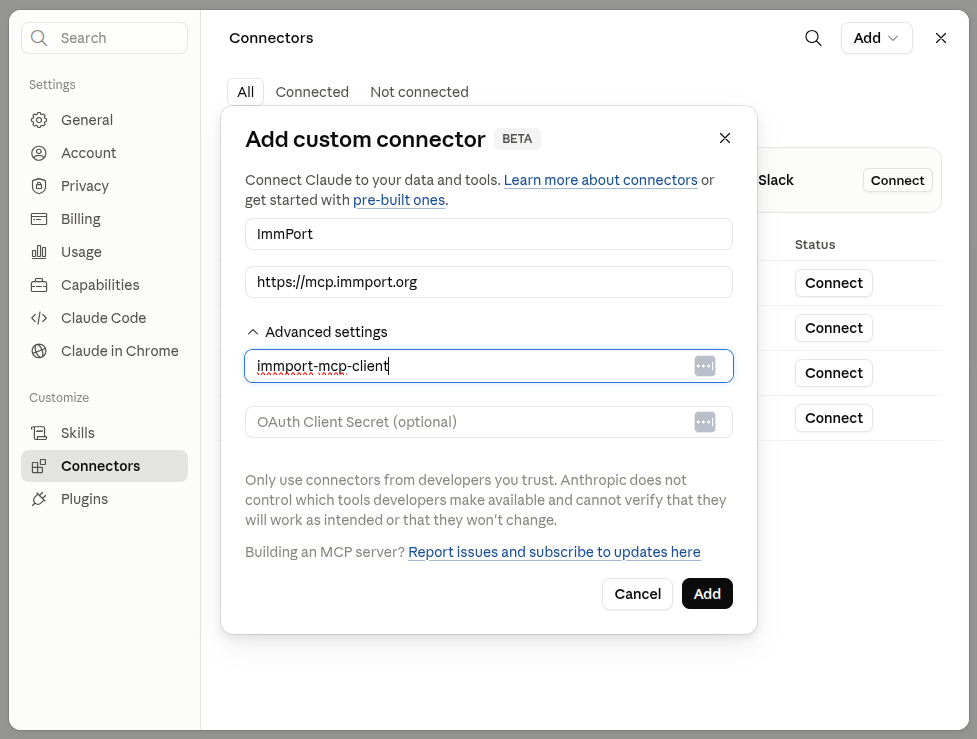
- Go to Customize → Connectors and click +
- Select Add Custom Connector
- Enter a name (e.g.
ImmPort), set URL tohttps://mcp.immport.org - Set Client ID to
immport-mcp-clientand leave Client Secret blank - Click Connect — you will be redirected to the ImmPort login screen
- Sign in with your ImmPort production credentials
- After login, claude.ai receives an access token. It is forwarded automatically on every tool call — no further configuration is needed
API Key (Bearer Token) — Desktop, CLI, and IDE Agents
For clients that are not browser-based, authenticate by passing your ImmPort API key
as a Bearer token in the Authorization header. The server accepts the key directly —
there is no OAuth2 redirect involved.
Before you begin: download your API key from
https://www.immport.org/auth/api/keys.
Open the downloaded JSON file and copy the value of the "api_key" field. Keys are
valid for 30 days — see the note at the bottom of this page about renewal.
Claude Desktop
Claude Desktop starts the server on your computer with
uv (install it
first). Open Settings → Developer → Edit Config and add the following to
claude_desktop_config.json:
{
  "mcpServers": {
    "immport": {
      "command": "uvx",
      "args": ["immport-mcp"],
      "env": {
        "IMMPORT_API_KEY": "<your_immport_api_key>"
      }
    }
  }
}
Replace <your_immport_api_key> with the value from your downloaded key JSON, then
restart Claude Desktop. uvx downloads the latest version of immport-mcp from PyPI
the first time and keeps it up to date.
Tip
Claude Desktop can also use the hosted server without an API key: add
https://mcp.immport.org under Settings → Connectors, the same way as in claude.ai.
Claude Code
Register the server once from the terminal. Claude Code stores the configuration persistently across sessions. To run the server locally:
claude mcp add immport -e IMMPORT_API_KEY=<your_immport_api_key> -- uvx immport-mcp
Or connect to the hosted server:
claude mcp add --transport http immport https://mcp.immport.org \
  --header "Authorization: Bearer <your_immport_api_key>"
Verify the connection:
claude mcp list
# Expected output:
# immport: https://mcp.immport.org - Connected
To update the key after renewal, remove and re-add the server:
claude mcp remove immport
claude mcp add --transport http immport https://mcp.immport.org \
  --header "Authorization: Bearer <your_new_immport_api_key>"
Google Antigravity IDE
Antigravity uses a raw JSON config file to register MCP servers.
- Press ++ctrl+alt+b++ (Windows/Linux) or ++cmd+option+b++ (macOS) to open the Agent Panel
- Click the ⋮ menu at the top-right and select MCP Servers
- Click Manage MCP Servers → View raw config — this opens
mcp_config.jsonin the editor - Add the following inside the
mcpServersobject:
{
  "mcpServers": {
    "immport": {
      "serverUrl": "https://mcp.immport.org",
      "headers": {
        "Authorization": "Bearer <your_immport_api_key>"
      }
    }
  }
}
- Save the file (++ctrl+s++ / ++cmd+s++) and click Refresh in the MCP Servers pane
Note
Antigravity uses serverUrl (not url) as the key for remote MCP servers.
Other MCP clients
Any MCP client that can start a server from the command line can run the ImmPort server
locally. Configure a stdio server with the command uvx immport-mcp (or
pip install immport-mcp, then immport-mcp) and the environment variable
IMMPORT_API_KEY. Other settings are listed in the
package README.
Claude Skills for ImmPort
ImmPort skills teach Claude how to find and compare studies with these tools and analyse downloaded Tab.zip packages.
Tips for Best Results
Check data availability first
Before fetching study data or assay results, call get_study_data_availability for
the study. It returns record counts for every data category in one fast call — so you
know exactly which assay types and resources are worth querying before making any
additional requests.
Use parallel tool calls
Many AI assistants support calling multiple tools at once. Ask for several study resources in a single message — e.g. "Give me the summary, subjects, and experiments for SDY1" — and the assistant will fetch all three in parallel.
Tab.zip for deep analysis
For comprehensive single-study analysis, ask for the Tab.zip download link instead of
multiple get_study_data calls. The zip contains every study metadata table as a TSV
file.
"Get me a download link for all structured data from SDY3510"
Public tools need no login
search_studies, search_subjects, lookup_controlled_vocabulary and get_data_model are public —
they work without any API key. Connect these first to explore available data before
authenticating.
API key expiry
ImmPort API keys expire after 30 days. Renew at https://www.immport.org/auth/api/keys. If you connected via OAuth2 (claude.ai), the server handles token refresh automatically.
Usage Metrics
To understand how ImmPort data is used, the server records one usage entry per tool call:
the tool name, its parameters (for example study accessions or search terms) and your
ImmPort username — the same way ImmPort's website and API record usage. No other data from
your computer or conversation is sent. When you run the server locally, you can turn this
off with IMMPORT_METRICS_ENABLED=false.
Related Pages
- API Keys — how to create and manage ImmPort API keys
- ImmPort Authentication Service — OAuth2 overview
- Shared Data API — direct REST API access
- immport-mcp on PyPI and GitHub — package, release notes, and issue tracker
- immport-skills on GitHub — Claude skills for ImmPort