Download Guide for Controlled Studies in ImmPort
This guide explains how to request access to and download data from controlled studies in ImmPort.
What is a Controlled Dataset?
A controlled dataset is a study whose data are too sensitive to share openly, such as individual-level clinical or genomic data. These studies require access controls beyond standard ImmPort registration: researchers must verify their identity, have their intended research use reviewed and approved, and agree to a Data Use Agreement before they can download the data.
Access to controlled studies is managed through AccessClinicalData@NIAID (ACD), the dedicated NIH Controlled-Access Data Repository (CADR) for ImmPort, rather than through ImmPort directly.
Note
The majority of ImmPort studies are openly available to any registered ImmPort user. Only studies explicitly designated as controlled-access require the process described on this page.
How Controlled Data Works in ImmPort
- Investigator submits study data to ImmPort through the normal data submission process
- The study is flagged as controlled-access in ImmPort
- The dataset is made available through ACD
- Researchers discover the study in ImmPort, then go to ACD to request access
- ACD handles IAL2 identity verification, DAR review, DUA execution, and secure data download
What is AccessClinicalData@NIAID (ACD)?
AccessClinicalData@NIAID (ACD) is the NIAID-managed access system for controlled clinical research data. As an NIH CADR, it meets the NIH security and operational standards for controlled-access data and manages:
- IAL2-compliant identity verification
- Data Access Request (DAR) submission and review by federal employees
- Data Use Agreement (DUA) execution
- Secure data download post-approval
For the full list of NIH CADRs and applicable requirements, see the NIH Requirements for Controlled-Access Data Repositories and Users.
Identifying Controlled Studies
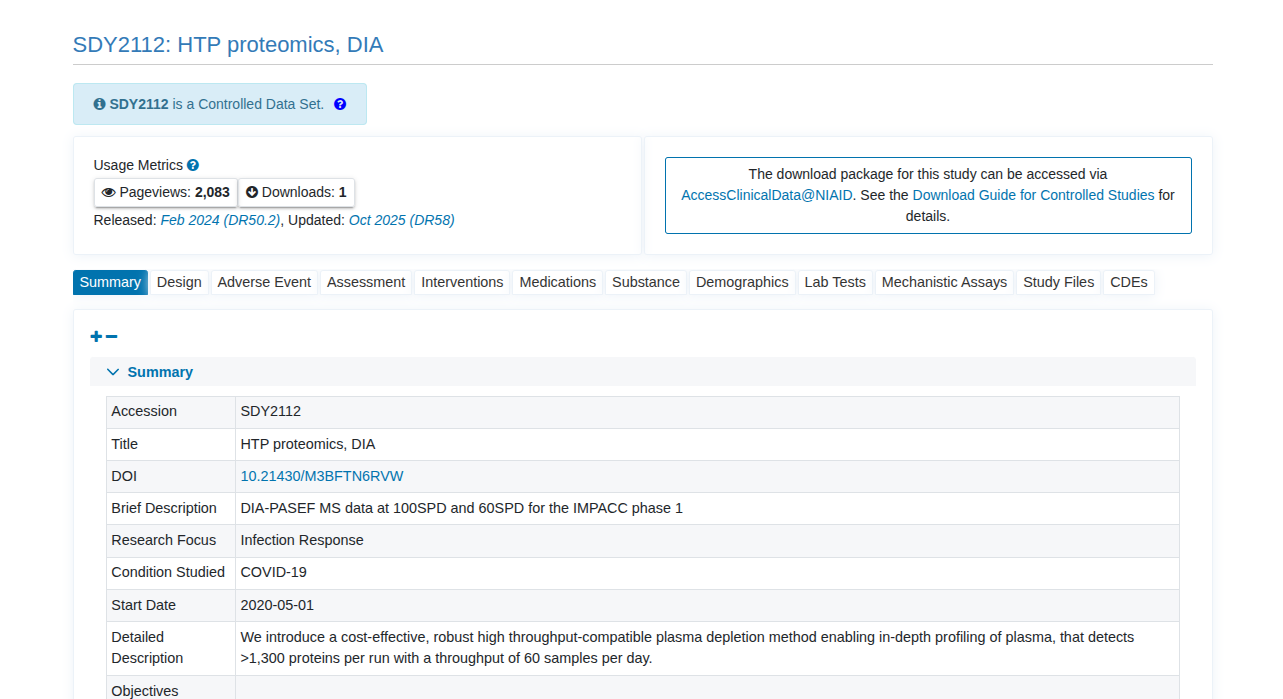
Controlled studies are marked with a Controlled badge below the study accession in ImmPort study search results.

On the study page, a banner identifies the study as a Controlled Data Set, and the download panel links to AccessClinicalData@NIAID instead of offering a direct download. Data files for these studies are not downloadable from ImmPort; use the ACD link to request access.
How to Request Access to a Controlled Study
Step 1 — Create an ACD Account
Visit https://accessclinicaldata.niaid.nih.gov — logging in will automatically create your account.
Supported login methods — identity verification required
NIH requires identity verification (known as IAL2) for access to controlled data. You will be asked to verify your identity once, typically by uploading a government-issued photo ID and taking a selfie. Accepted login options:
- ID.me
- Login.gov
- NIH email account
Gmail and other personal email accounts are not accepted. These requirements come from the NIH Office of Science Policy.
If you need help setting up a supported login account, contact accessclinicaldatasupport@mail.nih.gov.
Learn more about IAL2 in NIST SP 800-63A.
Step 2 — Locate the Study
Search for the study by ImmPort accession number (e.g., SDYnnnn) or by disease/condition on the ACD platform. You can also follow the ACD link from the study page in ImmPort (see Identifying Controlled Studies).
Step 3 — Submit a Data Access Request (DAR)
Click Request Access on the ACD study page and complete the DAR form:
- Institutional affiliation
- Description of intended research use
- Review and signature of the Data Use Agreement (DUA)
Step 4 — Await Approval
DARs are reviewed by the study's data access committee using federal employees, as required under the NIH CADR framework. You will be notified by email when approved or if additional information is required.
Step 5 — Download the Data
Once approved, log back into ACD to download the study files securely.
Data Access Request (DAR) Policy
- DARs are valid for 12 months and must be renewed annually
- A new DAR must be submitted each year for continued access.
Support
| Issue | Contact |
|---|---|
| ACD login account setup or access issues | accessclinicaldatasupport@mail.nih.gov |
| Controlled dataset access or DAR issues | accessclinicaldatasupport@mail.nih.gov |
| General ImmPort questions | ImmPort_Helpdesk@immport.org |